
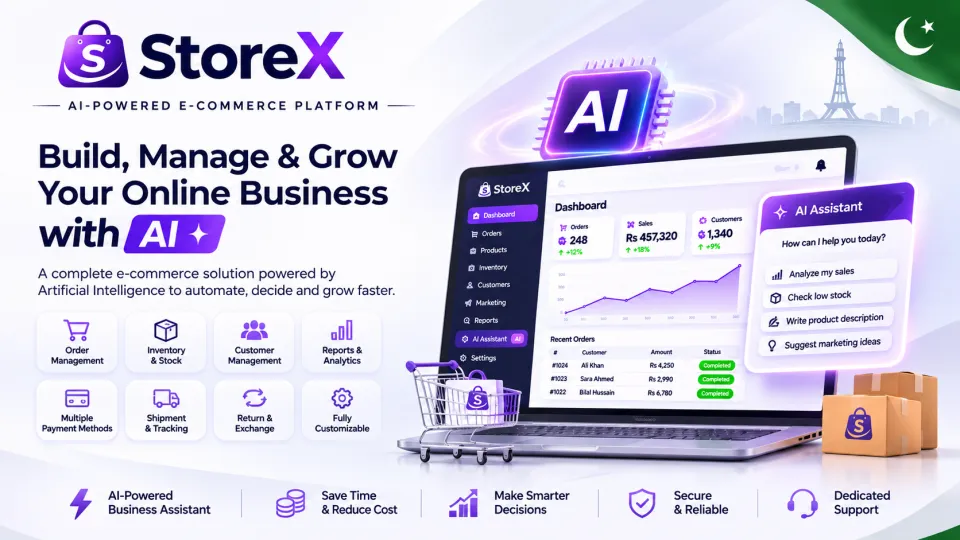
Store-X
Store-X is an all-in-one eCommerce platform to build and manage your online store. Easily handle pro...
License · Regular, Extended
Description
Store-X – Build Your Online Store, Simplify Operations and Grow Your Business
Your Store. Your Brand. Your Customers. Your Control.
Running a successful online business requires more than a beautiful website. Managing products, stock, customer orders, payments, shipping, refunds and promotions can quickly become difficult when information is scattered across different systems.
Store-X is a Laravel-based eCommerce software platform designed to bring important storefront and business administration modules together.
From AI assistance and product management to Advance COD, invoices, courier operations, SEO and GEO, Store-X helps online store owners organize everyday operations.
Common eCommerce Challenges & Store-X Solutions
1. Complicated Order Management
Keeping track of numerous orders and customer details manually can lead to errors and delays.
Store-X Solution: Centralized order management, status updates and customer records.
2. Inventory Confusion
Incorrect stock information can lead to selling unavailable products.
Store-X Solution: Stock In, Stock Out, adjustments, movement history and low-stock monitoring.
3. COD Settlement Problems
A delivered parcel does not automatically mean the courier has transferred the collected payment.
Store-X Solution: COD reconciliation, courier collection records and payout evidence.
4. Difficult Shopping Experience
Customers need clear products, usable navigation and convenient checkout.
Store-X Solution: Product search, filters, categories, wishlist, cart and checkout.
5. Repetitive Content Work
Writing product content and organizing marketing information requires significant effort.
Store-X Solution: AI-assisted product content and centralized marketing modules.
6. Disconnected Business Tools
Switching between systems makes daily operations more difficult to coordinate.
Store-X Solution: A unified administration experience for important business modules.
Explore Store-X in Detail
1. Centralized Admin Dashboard
Store-X brings important administrative information together, with related management areas for orders, customers, products, inventory, payments, courier operations, marketing and configuration.
Business benefit: Reduce scattered recordkeeping and maintain better visibility into store activities.
2. AI Admin Assistant
AI MODULEStore-X includes AI Admin Assistant modules designed to help administrators understand available business information and software workflows.
- Sales and order questions
- Product information guidance
- Inventory information assistance
- Shipping and courier explanations
- COD management guidance
- Returns and refunds information
- Marketing and SEO navigation
- Conversation history
AI functionality requires supported provider configuration and access to appropriate data. AI-generated answers should be checked when financial accuracy is important.
3. AI Product Content Assistant
Prepare AI-assisted drafts of product titles, descriptions and search-oriented product information. Administrators should review and edit suggested content before publication.
Business benefit: Reduce repetitive writing work and prepare more consistent catalog content.
4. AI Shopping Assistant
Store-X includes AI Shopping Assistant modules intended to support customer product discovery using available catalog information. Functionality depends on provider credentials, configuration and accessible product data.
5. Product Catalog Management
Organize products with descriptions, images, categories, brands, collections, tags, types, seasons, genders, option values and variants.
Product pricing, stock assignment and SEO fields support detailed catalog administration. These capabilities help merchants organize varied product ranges within one system.
6. Inventory Management
Inventory modules cover stock visibility, Stock In, Stock Out, manual adjustments, stock movement history, low-stock monitoring and out-of-stock records.
Business benefit: Keep better records of product availability and inventory changes.
7. Shopping Cart and Checkout
Customers can browse products, select available options, add items to the shopping cart, adjust quantities and proceed through applicable checkout steps.
Checkout collects relevant customer, address, shipping and payment information according to store configuration.
8. Order Management
Store-X provides order listing, order details, status management and relevant customer and payment records.
Merchants can use these administration tools to organize fulfillment activity and respond to order-related questions.
9. Customer Order Cancellation
CUSTOMER FEATURECustomers can cancel eligible orders according to the current order status and configured cancellation rules.
Business benefit: Give customers a clear cancellation process while maintaining the store's order controls.
10. Invoice Generation and Printing
INVOICE PRINTINGStore-X includes invoice views and printing capabilities for customers and administrators. An invoice can display order items, quantities, prices, totals and relevant payment breakdowns.
Business benefit: Support customer documentation, internal order records and packing workflows.
Local legal, tax and electronic-invoicing compliance must be considered separately.
11. Cash on Delivery
Cash on Delivery workflows support merchants who collect qualifying order payments upon delivery. COD information can be managed alongside relevant order and shipment records.
12. Advance Payment + Remaining COD
ADVANCE CODStore-X includes Advance COD settings and checkout workflows for collecting an upfront deposit against a qualifying COD order.
- Configurable advance percentage
- Advance payment method selection
- Deposit Now calculation
- Remaining COD calculation
- Advance payment receipt records
- Advance payment review
- Order-level payment breakdown
- Invoice advance breakdown
Example: Rs. 20,000 Order
Order Total: Rs. 20,000
Illustrative 20% Advance: Rs. 4,000
Remaining COD: Rs. 16,000
Business benefit: Provide an upfront-payment process before dispatching selected COD orders. The actual percentage, available payment methods and verification procedures depend on configuration.
13. Manual Payments and Payment Verification
Manage manual payment instructions, bank transfer details, payment references, receipts and administrative verification records.
Switch Payment Gateway integration modules exist, but live operation has not yet been verified. Officially approved merchants with authorized credentials may request free integration assistance.
14. Courier and Shipment Management
Store-X includes shipment records, courier configuration, booking workflows, pickup management, dispatch manifests, shipping labels, tracking, tracking recovery, webhook review and courier reports.
MANUAL COURIER TESTED
Manual Courier workflows have been tested.
TCS, Leopards, PostEx, Trax, BlueEx and M&P live integrations have not yet been tested. Their activation requires official approval, authorized API credentials, technical compatibility and successful testing.
15. COD Finance and Courier Reconciliation
Courier finance modules help organize COD collection records, statement imports, settlement reviews, bank payout evidence and reconciliation information.
These tools support the distinction between a parcel being delivered and the courier actually transferring the collected funds.
16. Returns, Exchanges and Refunds
After-sales modules cover customer return requests, exchange-related records, refund workflows, reverse-shipping information and relevant store settings.
Actions depend on applicable store policies and order statuses.
17. Customer Accounts and Wishlist
Customers can access account-related features such as registration, profiles, saved addresses, order history, order details, wishlist and applicable notifications.
These features support a more organized customer shopping and after-sales experience.
18. Customer Support and Product Reviews
Customer support and review modules help merchants organize product feedback, customer requests and post-purchase communication.
Customer feedback can also help identify opportunities to improve products and service quality.
19. Coupons and Promotional Offers
Manage promotional coupons and their applicable conditions to support store campaigns and customer incentives.
20. Email Marketing
Store-X includes email campaign-related modules, audiences, insights, delivery-related records and SMTP configuration.
Outbound email requires suitable server and email-provider settings. Scheduled campaigns may require Laravel Cron configuration.
21. WhatsApp Marketing
WhatsApp modules include provider settings, subscriber records, campaign-related functions and notification workflows.
Messaging availability depends on provider configuration, authorized credentials, customer consent and applicable messaging policies. Third-party fees may apply.
22. Affiliate Marketing
Store-X includes affiliate applications, referral links, commission records, payout workflows, risk review and audit-related modules.
These tools help merchants organize referral marketing and monitor related activities.
23. Classic Storefront Theme
CURRENTLY SUPPORTEDThe Classic Theme is the currently supported Store-X storefront theme.
Available branding and layout configuration may include relevant navigation menus, pages, homepage sections and store appearance settings.
24. AI Theme Builder
FUTURE UPDATEStore-X includes modules related to future AI-assisted theme building and design previews.
The development direction includes AI-assisted layouts, styling suggestions, color recommendations and storefront section designs.
25. Homepage and Storefront Customization
Manage relevant homepage sections, menu items, navigation structures, static pages, branding and social links.
Supported customization depends on the currently available Classic Theme.
26. Blog and Content Management
Publish blog content, organize blog categories and maintain relevant informational pages.
Blog content can support product education, customer engagement and a broader content-marketing strategy.
27. SEO – Search Engine Optimization
SEO MODULESStore-X includes SEO-related settings, product search fields, content management and sitemap-related support.
- SEO titles and metadata
- Product SEO information
- Store SEO settings
- Sitemap support
- Blog content
- AI-assisted product content drafting
Business benefit: Organize content for traditional search engines and make important product details easier to understand.
SEO cannot guarantee rankings, search traffic or revenue.
28. GEO – Generative Engine Optimization
GEO MODULESGenerative Engine Optimization focuses on providing clear, structured and informative content that may be useful in AI-powered search and discovery environments.
Store-X includes GEO-related dashboard, catalog and product FAQ modules.
- GEO Dashboard
- GEO Catalog
- Product FAQs
- Structured product information
- Detailed product explanations
- Question-and-answer content
SEO focuses on traditional search visibility, while GEO emphasizes clear content that can support AI-oriented discovery.
GEO does not guarantee AI citations, recommendations, rankings or sales.
29. Product FAQs and Structured Information
Help customers understand products through useful questions and answers about features, usage, specifications and other relevant details.
Clear product information can support customers and contribute to broader SEO and GEO content preparation.
30. Security, Licensing and Installation
Store-X includes administrative features related to authentication, CAPTCHA settings, email-based 2FA settings, activity logs, license activation and validation, and installation checks.
A web installation wizard helps configure the application with the required database and initial administrator settings.
Security also depends on correct hosting configuration, HTTPS, access permissions, responsible credential management and ongoing maintenance.
Free Integration Support for Approved Merchants
Already approved by Switch Payment Gateway or a supported courier company? We've got you covered!
Merchants with official provider approval and valid authorized API credentials may contact Store-X Support for free setup, configuration and testing assistance for the currently untested Switch and specified courier integrations.
No additional Store-X service fee for eligible assistance.
Merchant approval fees, subscriptions and other third-party charges are excluded. Successful activation depends on provider compatibility and technical testing.
Frequently Asked Questions
Does Store-X include Advance Payment + COD?
Yes. Advance COD-related modules include percentage configuration, deposit calculation, remaining COD, receipt records and payment breakdowns.
Can Store-X print customer invoices?
Yes. Invoice views and printing functionality are included for customers and administrators.
Can customers cancel orders?
Eligible orders may be canceled according to their status and the applicable cancellation rules.
Which storefront theme is supported?
Classic Theme is currently supported. Other theme presets are not supported in the current release.
Is AI Theme Builder ready?
No. Related modules exist, but the AI Theme Builder is a future-update feature and is not presently production-ready.
Are all courier APIs tested?
No. Manual Courier is tested. TCS, Leopards, PostEx, Trax, BlueEx and M&P live APIs have not yet been tested.
Is Switch Payment Gateway tested?
No. The integration module exists but live functionality has not yet been verified.
Do I need external AI or messaging accounts?
Provider-dependent services require suitable credentials and configuration. Separate provider fees may apply.
Does Store-X include SEO and GEO?
Yes. The platform includes relevant SEO and GEO-related content and management modules, without guaranteed search outcomes.
Which hosting provider is required?
Hostinger hosting is required under the current Store-X supported-hosting policy. The selected plan must still meet all technical requirements.
Our Commitment – We Grow With Our Customers
At Store-X, we believe our relationship with customers should extend beyond the purchase.
Your reviews, feedback and real-world experiences matter. We use customer suggestions to help identify improvements, prioritize fixes, refine existing features and plan future updates.
Changes and new functionality are considered in light of technical feasibility, development priorities, testing and applicable update terms.
Your Feedback Matters. Your Business Matters. We Grow With Our Customers.
Store-X Complete Feature Directory
Explore the Store-X eCommerce platform, including 165 listed features, management tools and supporting modules.
INCLUDED MODULE TESTED / SUPPORTED NOT TESTED FUTURE UPDATE
An Included Module label indicates the presence of related software or interfaces. It does not mean every workflow has been independently live-tested.
Storefront & Customer Experience
Product Catalog & Content Management
Inventory, Orders & Customers
Payments, Advance COD & Finance
Shipping, Courier & After-Sales
AI, SEO, GEO & Theme Modules
Marketing, Security & Store Settings
Free Integration Support for Approved Merchants
Already approved by Switch Payment Gateway or a supported courier company? Store-X provides free setup, configuration and testing assistance for the listed untested integrations when merchants have official provider approval and authorized API credentials.
No additional Store-X service fee for eligible assistance. Third-party charges are excluded. Successful activation depends on compatibility and testing.
Store-X Hosting & Server Requirements
Important before purchase: A compatible Hostinger hosting account is required under the current Store-X supported-hosting policy.
Your chosen plan must also meet the PHP, database, extension, file-permission and server configuration requirements described below.
Choosing Hostinger alone does not automatically guarantee compatibility. Verify your specific plan before installation.
Essential Hosting Requirements
Hostinger Hosting
Use a suitable Hostinger Web or Cloud hosting plan with access to hPanel, PHP configuration, a supported database and website files.
Check that your selected plan meets the complete technical checklist.
PHP 8.4.1 or Newer
Store-X requires PHP 8.4.1 or a newer compatible release.
Select the appropriate PHP version through hPanel and verify the actual installed patch version.
Laravel Compatibility
The server environment must support the Laravel application and bundled dependencies shipped in the Store-X package.
Do not replace bundled dependencies without a documented technical requirement.
MySQL
Create a fresh, empty MySQL database and a database user with the required access privileges.
Prepare the database hostname, port, name, username and password for installation.
Connected Domain and SSL
Use a connected domain with a working HTTPS certificate for a production store. Ensure that URL and SSL configuration work correctly.
Apache / LiteSpeed-Compatible Setup
The hosting environment must support the routing and security rules expected by the supplied .htaccess files.
Keep application and private files protected from public access.
Required PHP Extensions
Verify the following extensions in the PHP configuration of your Hostinger hosting plan.
Some PHP capabilities may already be available by default. The server must also satisfy any additional requirements imposed by the bundled Laravel dependencies.
Files, Permissions & Installation
Upload and extract the original Store-X Buyer ZIP with its directory structure intact.
Keep the application files, entry points, dependencies and supplied database setup resources in their intended locations.
The installer must be able to prepare the required environment configuration.
Ensure appropriate write permissions for:
core/storagecore/bootstrap/cache- Required application upload directories
Use a new empty database for the initial installation. Do not attempt installation over an existing database containing unrelated tables.
Prepare administrator information, complete the initial store configuration and follow the required license activation process.
.env files, database credentials, license secrets or private application files publicly. Keep the package's security rules intact and disable or remove the installer when installation is finished.
Automation & Additional Services
Scheduled Tasks
Cron Job access is needed for scheduled functions such as courier tracking updates, cleanup and automated campaigns when those functions are enabled.
Configure the scheduler to run every minute using the appropriate PHP CLI executable and project directory.
php artisan schedule:run
The line above is the Laravel command, not a complete Hostinger Cron Job entry. The full command must use the correct server paths.
Memory, Storage & Processing
Choose adequate PHP memory, storage, CPU capacity, upload size limits and bandwidth for your product catalog and expected traffic.
Resource availability varies by Hostinger plan.
SMTP Configuration
Configure a compatible SMTP provider for outgoing email and email-dependent features.
Provider credentials and possible third-party charges are separate from the Store-X software.
AI Service Access
AI Admin Assistant, AI Product Content and AI Shopping features may require compatible provider API keys, connectivity and usage allowance.
Merchant Approval & Credentials
External payment gateway usage requires suitable merchant approval and authorized credentials. Switch Payment Gateway has not been live-tested.
Third-Party API Access
Courier APIs and messaging providers may require separate merchant accounts, API credentials, approval and provider fees.
Manual Courier is tested; listed external courier APIs are not yet live-tested.
How to Prepare Hostinger for Store-X
- Choose Hosting: Select a compatible Hostinger hosting plan.
- Configure PHP: Set PHP 8.4.1 or newer.
- Check Extensions: Verify the required extensions and dependency compatibility.
- Create Database: Prepare a fresh, empty MySQL database.
- Connect Domain: Configure the domain and HTTPS.
- Upload Store-X: Extract the complete Buyer package without changing its directory structure.
- Open Installer: Visit the supplied installation entry point on your domain.
- Complete Setup: Enter the database details, configure the store and create an administrator account.
- Activate License: Complete required license validation and verify the storefront and admin access.
- Secure Installation: Protect private files and remove or disable the installation entry point.
- Configure Automation: Add scheduler configuration if needed and verify important email, checkout and shipping workflows before accepting customer orders.
Important Hosting Compatibility Notice
Hostinger hosting is required under the current Store-X supported-hosting policy.
The Store-X installer checks technical prerequisites, rather than verifying a hosting company's brand. Other hosting providers are outside the currently stated hosting policy and should not be assumed supported for this release.
A Hostinger plan must still meet the complete technical requirements described above.
External payment services, couriers, AI platforms and messaging providers may require additional configuration and separate charges.
Official Hostinger Setup Resources
Use Hostinger's official documentation to configure the required hosting settings: